





![[PenelopeTemplate]alexandra-lammerink-50YR0v44QUs-unsplash](http://static.showit.co/400/-sKPeYObSVua0wuOPMIryQ/shared/penelopetemplate_alexandra-lammerink-50yr0v44qus-unsplash.jpg "[PenelopeTemplate]alexandra-lammerink-50YR0v44QUs-unsplash")
![[PenelopeTemplate]alexandra-lammerink-4Mnu_FzKNWY-unsplash](http://static.showit.co/400/v6DcnJcbR5yNNW6Pw_N18Q/shared/penelopetemplate_alexandra-lammerink-4mnu_fzknwy-unsplash.jpg "[PenelopeTemplate]alexandra-lammerink-4Mnu_FzKNWY-unsplash")
![[PenelopeTemaple]alexandra-lammerink-51mGz4OKUJs-unsplash](http://static.showit.co/400/U8IpA62zSd6dYfONsI94kQ/shared/penelopetemaple_alexandra-lammerink-51mgz4okujs-unsplash.jpg "[PenelopeTemaple]alexandra-lammerink-51mGz4OKUJs-unsplash")
How To Organize Your DigiScrap Supplies Using Adobe Bridge

Happy Great Computer Spring Clean-a-thon Day 3 everyone! Today’s post is being brought to you by one of my awesome Creative Team members, Inga! She’s going to share a peek into how she organizes her digital scrapbooking supplies using Adobe Bridge, so take it away, Inga!
Hello fellow digi scrappers!
Today I will tell you a little bit about how I use Adobe Bridge to organise my scrapbooking supplies.
Why I Decided to Use Adobe Bridge
There was that day, you know. That day when I realised, my titles needed to get better and that maybe it would help, if I could find my alphas. And not just use the same three over and over again, because I liked them and knew where they were. Or that questions like “Which summer kit would match those photos?” or “Didn’t I have a perfect mask set for this?” shouldn’t be that hard to answer.
It was the day, I knew I needed to think about organising my supplies.
For a few glorious seconds I thought, I might tag everything. Oh envision the joy of scrapping, if I can just search for a red and pink patterned paper and all options appear! Then reality kicked back in and I reminded myself, that a) I rarely search for these things, but scrap mostly with kits. And that b) I would fail miserably. Tagging all of my existing stuff like that and keeping it up? Hahaha, good joke.
So I started with the most important thing, if you want to get organised. I figured out, what I really wanted and what would really be helpful for me. Working full time and juggling family activities and household work at the weekends, my free time is precious. I definitely didn’t want to spend as much time organising as scrapping. Also, I have a folder system that is ok for saving things, just not great for browsing through them (it’s pretty much shop/designer/kit). With that in mind I came up with a list of what I wanted and what I expected from the program, I intended to use for it:
- I scrap with kits mostly, so I just want to be able to browse all my kits in one place easily
- I want to find alpha options by seeing all my alphas
- Same goes for my templates
- I need a certain category for helpful little extras like masks, frame packs, date stamps, tape sets ect.
- The program needs to show previews of PSD files
- I want to add to my categories by drag and drop, so I can assemble my categories quickly
- It needs to be fairly simple
- If possible, it should work well with Photoshop
- I don’t really want to spend money on it.
I looked around a bit, before I realised I already own the right program for me. If you buy Adobe Photoshop, it will usually come with a program called Adobe Bridge. It’s an image browser/organiser that works just great with Photoshop.
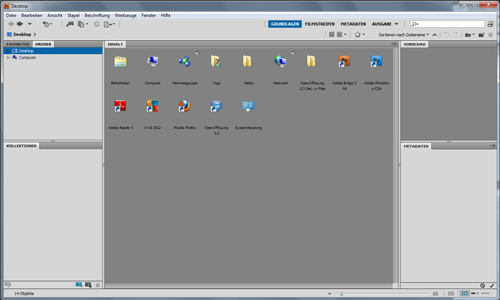
In fact, you can directly start the program from the PS work space. I found that to be a nice little bonus, that I do not have to swich to my desktop or program list. If you go the Datei/File menu in PS, you will see an option called In Bridge suchen/Search with Bridge. If you click it, Bridge will open.
Btw, I apologize for all the German screen shots. I will always give you button and menu names in the way German/English translation. I’m sure you will be able to figure them out in the English version, even if my translation isn’t exact.
How Adobe Bridge Works for My Scrapbooking Needs
Right, so how did Bridge work with my scrapbooking needs? From my list I knew, I just needed very few categories: Kits and element or paper packs, alphas, templates, quickpages and extras. All of this categories I wanted to browse very quick or very detailed, depending on my purposes.
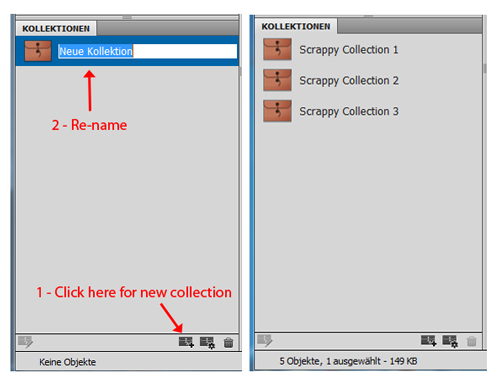
In Bridge the easiest way to achieve that, are the so called Kollektionen/Collections. The collections allow you to quickly assemble certain files into themed collections. Perfect! I quickly set up my desired collections. For this tutorial I have done some sample collections.
Now it was time to fill them. This is done super easy. You just use the browsing function, click trough your folders and drag and drop the files into the collection. A big help with browsing was the “back” button in the top corner. Here I added previews of all my kits by the talented Kristin Cronin-Barrow to “Scrappy Collection 1”.
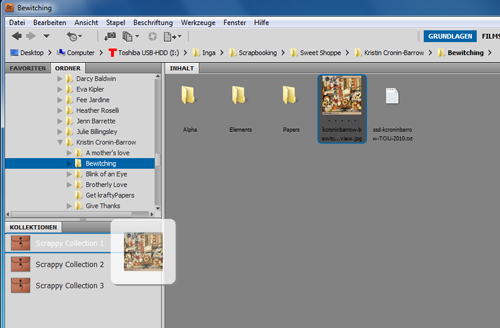
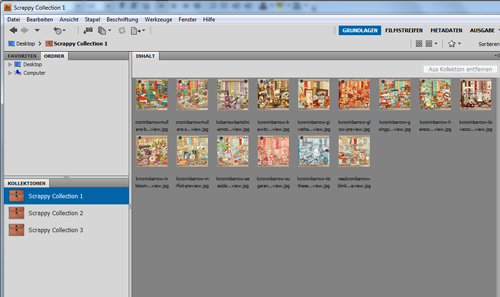
Back then I systematically browsed through my folders and added previews. The only exception was my alphas, where I added an example letter. I originally thought it would take me weeks to get the initial organising done, but all it took was maybe four evenings with one to two hours each.
The collections allow me to scan my stash very efficiently now. If I’m not sure which kit to use, I will just have a look at all my kits in one place. Same for alphas, templates or quickpages.
You can of course make collections for specific scrapping needs like “Christmas kits” or “Designer XYZ”. However, you cannot make sub-collections to an existing collection. So this approach is only practical, if you want a very basic and simple organising structure. As I wanted to keep my organising a reasonable minimum, it worked great for me.
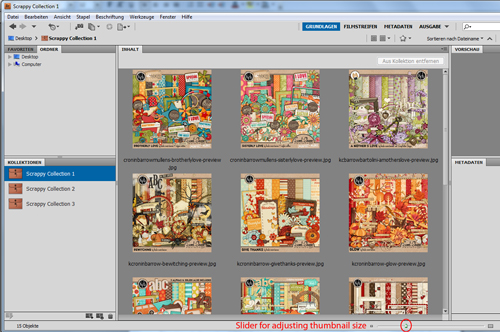
You have many different viewing modes, from full screen previews to lists, thumbnails or the very fun Überprüfungsmodus/Review mode. I mostly use thumbnails for quick browsing, adjusting the size of them to my needs by a simple slider at the bottom.
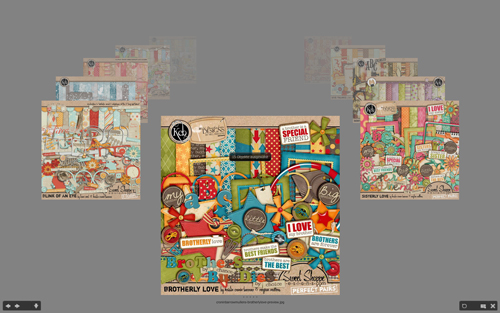
Überprüfungsmodus/Review mode is great for relaxed browsing through all the images. I use it a lot, when I want to look at kit options and don’t have anything specific in mind. It will show you each image in a sort of gallery reel.
As you can see this very simple set-up pretty much covers everything, I had on my wish list. It helped me a great deal with my scrapping, but didn’t cost me a lot of time.
Maintaining My System & Backing Up
Now, how do I keep it up?
When I download supplies, they automatically end up in my download folder. Every few days… or directly if I cannot wait to see and use them… I move them to a folder in my scrap supply folder system called “to be sorted”. I unzip them all (I use a freeware called 7-zip, but I know many prefer WinRar) and then there they sit until I do a short organising session next time. Those sessions include me putting everything nicely sorted into my folder system.
Once I’m done with that, I open Bridge and browse through the folders, adding all the new stuff to the collections. I will usually remember, if I just put something new in a certain shop or designer folder, so that doesn’t take long. Sometimes I do two sessions in one week, sometimes one in a month. It depends on how much I buy, how motivated I am and when the filling up “to be sorted” folder starts to annoy me. I never tried to establish any kind of schedule for it. I’m all about guild-free scrapping and organising.
But how about back-up? To make sure, my collections won’t get lost when I back up and/or re-install my system, I use the Stichwörter/Key words option. They are practically tags written into the meta data of the image files. But as I don’t want anybody to hurt themselves by falling asleep and off their chair (if that hasn’t happened already…), I will just tell you, that there is an option. If you wish to use Bridge for your organising, please feel free to contact me about it!
This is my organising system wrapped up. I hope it might give you some useful ideas for your own way of getting organised. Bridge does have a ton more options, that are great for photos. Things like filters, more complex keywords/tags, rating with a star system, doing batch re-naming, using zoom windows in review mode as well as options, that work with Adobe Camera Raw. I haven’t tried it out much, but I will likely do so in the future, when I start using Bridge for my photos, too. But so far I just love using it as a slightly abused scrap supplies organiser.
Inga
Thanks so much Inga! Awesome tips! I haven’t done much with Adobe Bridge but I’ll definitely be checking it out! Have a question for Inga? Feel free to ask it in the comments section of this post.









Woot! I love your system! And I love how you tailor-fit the software to the way you think, scrap, and buy stuff 🙂 I find Bridge rather clunky to use, and I blame that entirely on my ancient laptop, lol! But I do like how you can quickly bring up keywords to find exactly what you need to scrap. Yay!
Thanks! It sounds way better if you call it tailor-fit instead of lazy version. 🙂
Wow, I use ACDSee and the example you gave for seeing the preview pages all in one place has got my wheels turning. This is one thing that I will have to figure out as I am also a kit scrapper. Thanks for the great idea.
You go Ami! That is indeed a thing I really love. Browsing my whole stash has inspired more than one layout. I guess it depends on how many kits you have, but you can always cut it into several collections. I’m sure ACDSee has something like that, too.
love your idea. i am too a kit scrapper. But i have PSE9 and coincidentally i get the organizer instead of Bridge i may have to play and see if i can do the same thing.
I don’t have experience with Photoshop Elements, so hopefully someone else will chime in too, but you should be able to create collections using the Organizer. They just might be called something different – maybe albums?
There’s a video here that might be helpful: http://www.youtube.com/watch?v=fyy3j8bAFIU
Not sure albums are the same thing, though they might work just as well.
I would probably look for a tab that is called tags. I bet the collections will be a second of those tabs. That’s the set-up in Bridge. However, they may not show at default settings. If you find such a tab and there is none saying collections, right-click on the frame beside the tabs and see, if a collection window is one of the options appearing.
Hello Shelly, I never had PSE myself, but I am pretty sure the Organizer has the same two key features tags + collections. So I am optimistic, you canm do the same thing there, too.
I use the PSE Organizer for mine. Not sure I have done mine the ideal way but it works for me. You can create categories and sub categories. One category I have is templates and then the sub categories are 1 photo, 2 photo, 3 photo, etc. Other categories I have are travel, baby, boy, girl, etc. That’s how I do it anyway. Right now I am only organizing my kit previews and templates. Eventually, I want to get my alphas organized too.